By Andrew Adams · Co-founder / Senior Customer Service Engineer · The Link Source
The ConnectWise Cloud Backup Supply-Chain Attack: How a Trusted Vendor App Reached 173 Microsoft 365 Tenants
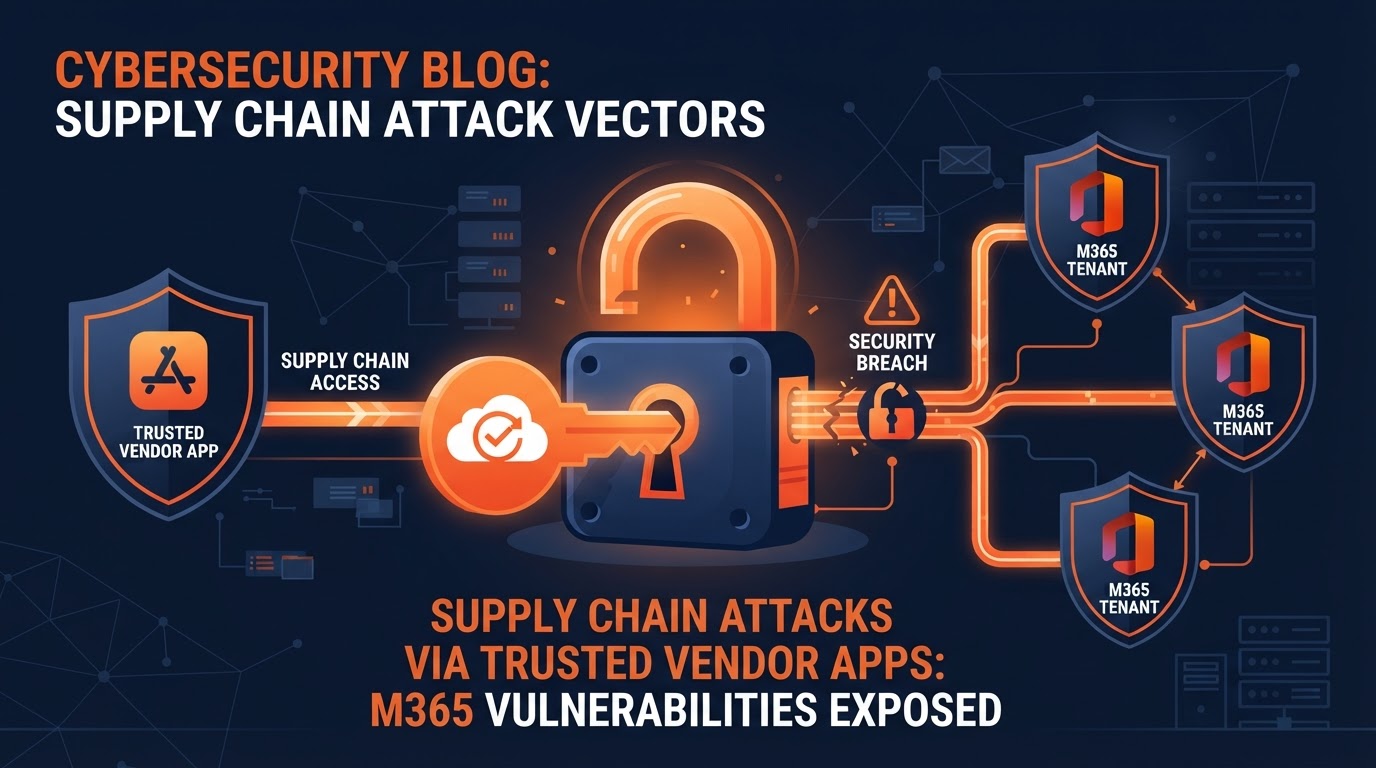
On October 17, 2026, ConnectWise shut down its Cloud Backup service after attackers hijacked the application's own identity and signed in to customer Microsoft 365 tenants. No one at the businesses did anything wrong. Here's what happened, why MFA didn't help, and what it teaches every business about trusted apps.
On Friday, October 17, 2026, ConnectWise shut down customer access to its Cloud Backup service (formerly SkyKick Cloud Backup) after confirming that attackers had hijacked the application's own identity inside Microsoft 365 and used it to sign in to customer tenants. By the time ConnectWise pulled the plug, researchers had tracked unauthorized sign-ins across 173 separate Microsoft 365 environments.
Here's the part that should make every business owner stop and read carefully: no one at the affected businesses did anything wrong. No employee clicked a bad link. No password was reused. No multi-factor authentication was bypassed. The attack came through a trusted vendor application that the businesses had already granted broad permissions to — and the attackers used the vendor's own credentials to walk through the front door.
The Link Source did not use this vendor, so our clients were not affected by this incident. But many companies were, and the lessons apply to every business that connects third-party apps to Microsoft 365.
What happened: a trusted app, not a stolen password
ConnectWise Cloud Backup is a Microsoft 365 backup product that works as a multi-tenant Entra ID (formerly Azure AD) application. To do its job — backing up mail, files, SharePoint and Teams — the application needs standing, broad permissions inside every customer's Microsoft 365 tenant. Those permissions are granted once, when the business installs the app, and then trusted indefinitely unless someone manually revokes them.
According to incident responders at Huntress and Todyl, a credential belonging to the Cloud Backup application itself was compromised. The attacker used that stolen application credential to authenticate directly to Microsoft 365 as the backup application, pulling Microsoft Graph access tokens from customer tenants starting on or around October 14, 2026. Because the application had already been pre-authorized in every tenant where a customer had installed it, the attacker could reach them all using the same stolen key.
Researchers identified the application under Microsoft Entra application ID 506e08f9-6e9a-4da4-942b-a099a03644ae, and observed sign-ins from a hosting-provider IP address that had nothing to do with legitimate ConnectWise infrastructure.
Why MFA didn't save anyone
This is the question we hear most: "We have MFA on every account. Aren't we protected?"
Not against this kind of attack. Multi-factor authentication protects human sign-ins — an employee typing a password and approving a prompt on their phone. The ConnectWise attack didn't use a human account at all. The attacker authenticated as the application, using the application's own client credential (a secret or certificate that lives in the vendor's tenant, not yours). Application sign-ins don't trigger MFA prompts because there's no human in the loop. The attacker simply presented the stolen app credential and Microsoft handed over a token with all the permissions the business had already granted the backup app.
In other words, every control most businesses invest in — strong passwords, MFA, conditional access for users — was irrelevant here. The breach came through a door the business had opened on purpose and then forgotten about.
The timeline: four days from first sign-in to lockdown
- October 14, 2026: Attackers begin using the stolen application credential to pull Microsoft Graph access tokens from customer tenants.
- October 15, 2026: Researchers observe unauthorized sign-ins from a hosting-provider IP address (144.172.64[.]128), a signal the traffic wasn't from legitimate ConnectWise infrastructure.
- October 16, 2026: ConnectWise confirms unauthorized sign-ins in 162 tenants.
- October 17, 2026: ConnectWise disables seven application identities tied to the incident and shuts off Cloud Backup access entirely. The confirmed tenant count rises to 173.
- October 18, 2026: Investigation and remediation ongoing. Cloud Backup access remains disabled. ConnectWise reports no evidence that backup archives themselves were accessed.
What the attackers could (and couldn't) reach
Because the Cloud Backup application held broad, previously granted permissions in each tenant, those sign-ins gave the attacker the technical ability to read and write mail and attachments, OneDrive and SharePoint files, and Teams chats. That's the scary part: the blast radius was whatever the business had granted the app, which for a backup product is usually "almost everything."
However, in the intrusions researchers analyzed, they identified only sign-in activity and did not find evidence that the threat actor created accounts, added permissions, changed passwords, or established persistence in any tenant through the backup app. ConnectWise also stated it had no evidence that stored backup archives were compromised. So while the access was broad, the confirmed damage appears limited — this time.
Why this is a supply-chain attack, not a phishing attack
This incident is being described as a supply-chain attack because the threat came through a trusted vendor in the software supply chain, not through a direct attack on the business. The businesses affected did everything right on their end. They used a reputable vendor. They granted the permissions the vendor needed. They had MFA. The failure happened upstream, at the vendor, and then cascaded down to every customer who had ever installed the app.
This is the new reality of business security. You can have perfect internal hygiene and still be breached because a vendor you trusted had a credential stolen. The attack surface is no longer just your employees and your network — it's every application, integration, and service you've connected to your environment.
Lessons for every business with Microsoft 365
1. Audit your enterprise applications regularly
Most businesses have no idea how many third-party applications have been granted permissions inside their Microsoft 365 tenant. Every app a former employee installed, every trial that was never removed, every integration a vendor set up years ago — they all still have access. Go to the Microsoft Entra admin center, open Enterprise applications, and review what's there. Disable anything you don't recognize or no longer use.
2. Question broad permissions before you grant them
When a vendor asks for access to "read and write all mail, files, and Teams chats," ask why. Some apps genuinely need broad access to do their job (backup products are a perfect example). But many don't, and you should push back or find an alternative that scopes permissions more tightly. The principle of least privilege applies to applications, not just people.
3. Revoke and re-grant periodically
Permissions granted to applications tend to live forever. Make it a practice to periodically revoke consent for apps you no longer use and re-grant only what's actively needed. This shrinks your blast radius if a vendor is ever compromised.
4. Monitor for unusual application sign-ins
The ConnectWise attack was detected because researchers noticed sign-ins from an IP address that didn't belong to the vendor. Application sign-in logs in Microsoft Entra can show you when and from where an app authenticated. Most businesses never look at these logs. A managed IT or security provider can set up alerts for sign-ins from unexpected locations, new app consent grants, and permission changes.
5. Don't put all your trust in one vendor
The Link Source chose not to use ConnectWise Cloud Backup, which is why our clients weren't affected. Vendor selection is a security decision. When you evaluate a backup, security, or management tool, ask about their credential handling, their incident response history, and whether their application uses least-privilege permissions. Diversifying your stack — and choosing vendors with strong security practices — reduces the chance that one vendor's breach becomes your breach.
6. Have an incident response plan that covers vendor breaches
When a vendor is breached, your response is different than when an employee is breached. You need to know how to disable the affected application in your tenant, check sign-in logs for unauthorized access, and verify whether any data was read or changed. If you don't have a plan for "a trusted vendor was compromised," now is the time to build one.
How The Link Source protects clients from this kind of attack
Because The Link Source did not use ConnectWise Cloud Backup, our clients' Microsoft 365 tenants were not exposed to this specific incident. But we don't rely on luck. Our approach to Microsoft 365 security includes:
- Vendor selection: We choose backup and management vendors with strong security practices and least-privilege application design.
- Application auditing: We review the enterprise applications connected to each client's tenant and flag anything with overly broad or unnecessary permissions.
- Monitoring: Our 24/7 monitoring includes Microsoft 365 sign-in activity, so unusual application sign-ins get investigated, not ignored.
- Least privilege: We scope every integration to the minimum permissions it needs, so a compromised vendor can't reach everything in your tenant.
- Incident response: We have a documented plan for vendor-side breaches, including how to disable affected apps and audit for unauthorized access.
The bigger picture: trusted apps are the new perimeter
For years, security advice focused on the network perimeter and on user accounts. That advice is still right, but it's no longer enough. The modern attack surface includes every application, integration, and service that's been granted access to your environment. A vendor you trust can be breached, and when they are, their access to your tenant becomes the attacker's access to your tenant.
The ConnectWise Cloud Backup incident is a clear, real-world example: 173 businesses were exposed not because they did something wrong, but because a vendor they trusted had a credential stolen. The businesses that weather this kind of incident best are the ones who knew what apps had access, had scoped those permissions tightly, and were monitoring for unusual activity when the breach happened.
If you're not sure which trusted apps have access to your Microsoft 365 tenant — or what permissions they have — that's the gap to close before the next vendor breach makes the news.
Article FAQ
What was the ConnectWise Cloud Backup incident?
In October 2026, attackers compromised a credential belonging to the ConnectWise Cloud Backup application (formerly SkyKick) and used it to sign in to customer Microsoft 365 tenants as the backup app. Because the app had already been granted broad permissions in each tenant, the attacker could potentially read and write mail, files, and Teams chats. ConnectWise shut down Cloud Backup access on October 17, 2026, after researchers tracked unauthorized sign-ins across 173 tenants.
Did the affected businesses do anything wrong?
No. No employee clicked a bad link, reused a password, or bypassed MFA. The attack came through a trusted vendor application that the businesses had already granted permissions to. The attackers used the vendor's own stolen application credential, so the breach originated upstream at the vendor and cascaded to every customer who had installed the app.
Why didn't multi-factor authentication (MFA) stop the attack?
MFA protects human sign-ins, like an employee typing a password and approving a prompt. The ConnectWise attack didn't use a human account. The attacker authenticated as the application itself, using the app's own client credential. Application sign-ins don't trigger MFA because there's no human in the loop, so MFA was irrelevant to this attack path.
Was The Link Source affected by the ConnectWise incident?
No. The Link Source did not use ConnectWise Cloud Backup, so our clients' Microsoft 365 tenants were not exposed to this incident. However, we treat vendor selection as a security decision and audit the enterprise applications connected to each client's tenant to minimize blast radius if any vendor is ever compromised.
How can a business protect itself from a supply-chain attack through a trusted app?
Audit the enterprise applications in your Microsoft 365 tenant regularly, disable anything you don't recognize or no longer use, question broad permissions before granting them, scope every integration to least privilege, monitor application sign-in logs for unusual activity, and have an incident response plan that covers vendor-side breaches. A managed IT or security provider can set up the monitoring and auditing for you.
What permissions did the ConnectWise Cloud Backup app have?
As a backup product, the application held broad permissions to read and write mail and attachments, OneDrive and SharePoint files, and Teams chats in every tenant where it was installed. Those permissions were granted once when the business installed the app and trusted indefinitely unless manually revoked. Researchers did not find evidence that the attacker created accounts, changed passwords, or established persistence, and ConnectWise reported no evidence that backup archives were accessed.
