
By Andrew Adams · Co-Founder & Lead IT Consultant · The Link Source
10 Reasons Why Firewalls are Essential for Your Servers

A server without a firewall is an open invitation for trouble. We break down the top 10 reasons why enabling a firewall is non-negotiable for any business server.
The First Line of Defense for Your Server
In the digital world, your server is the heart of your business operations. It stores your sensitive data, hosts your applications, and facilitates communication. Leaving it unprotected is like having a house without a lock on the front door. A server firewall is your digital security layer, standing at the entrance of your server and deciding who gets in and who stays out.
Top 10 Reasons to Enable Your Server Firewall
- Blocks Unauthorized Access: The primary job of a firewall is to prevent unauthorized users from gaining access to your server's resources.
- Protects Sensitive Data: By controlling traffic, firewalls help prevent data breaches and the theft of intellectual property or customer information.
- Prevents Malware Spread: Firewalls can block the communication channels that malware uses to spread from one server to another across your network.
- Mitigates DDoS Attacks: Advanced firewalls can identify and filter out the massive flood of traffic associated with Distributed Denial of Service (DDoS) attacks.
- Enables Secure Remote Access: Firewalls allow you to set up secure VPN tunnels, ensuring that remote employees can access server resources safely.
- Monitors Network Traffic: They provide valuable logs and insights into what traffic is entering and leaving your server, helping identify suspicious patterns.
- Controls Application Usage: You can restrict which applications are allowed to communicate over the network, reducing the attack surface.
- Prevents IP Spoofing: Firewalls can verify the source of incoming packets, preventing attackers from pretending to be a trusted source.
- Supports Compliance Requirements: Many industry regulations (like HIPAA or PCI-DSS) mandate the use of firewalls to protect data.
- Provides Peace of Mind: Knowing that a robust security layer is actively guarding your infrastructure allows you to focus on your business goals.
Network Firewall vs. Server Firewall: What's the Difference?
Many business owners assume that having a firewall on their network router is sufficient protection. While a network firewall is an essential first layer of defense, it and a server firewall are fundamentally different tools that work together — and relying on only one leaves dangerous gaps in your security posture.
The Network Firewall (Your Perimeter Guard)
A network firewall sits at the edge of your entire network — between the internet and all of your internal devices. Think of it as the front gate to your property. It filters incoming and outgoing traffic for every device on the network, including desktops, laptops, printers, and servers.
- Protects the entire network perimeter from external threats before they reach any internal device.
- Manages traffic between network segments, such as separating your guest Wi-Fi from your internal business network.
- Blocks known malicious IPs and domains at the network level, preventing threats from entering at all.
- Limitation: Once a threat gets past the perimeter — through a phishing email, an infected USB drive, or a compromised laptop — the network firewall can no longer stop it from spreading internally.
The Server Firewall (First Line of Defense for Your Server)
A server firewall runs directly on the server itself, controlling exactly which traffic is allowed to communicate with that specific machine. While the network firewall guards the perimeter, the server firewall is the primary protector of the server's internal assets. Think of it as the deadbolt on your front door; even if someone gets through the property gate, they still can't get into the house.
- Provides granular, per-server control over which IP addresses, ports, and protocols can connect to that machine — regardless of what's happening on the rest of the network.
- Stops lateral movement — if a threat actor compromises one machine inside your network, the server firewall prevents them from pivoting to your servers.
- Protects against insider threats and misconfigured internal devices that the network firewall wouldn't catch.
- Limitation: It only protects that specific server, not the rest of the network.
Why You Need Both: Visibility and Scope
These two layers are complementary, not interchangeable. A network firewall without a server firewall is like having a gated community with no locks on the individual houses. A server firewall without a network firewall means threats can reach the server directly before any filtering occurs.
Why is the network firewall's granularity different? While a network firewall has excellent port control, its visibility is limited to the perimeter. It sees traffic moving across the network, but it lacks "Process Awareness." For example, a network firewall can allow traffic on Port 443 (HTTPS), but it cannot distinguish between your legitimate web server software and a malicious script trying to send data out over that same port. The server firewall sits inside the operating system and can see exactly which application is trying to communicate, acting as the first line of defense for the server's internal environment by blocking specific malicious processes even if they hide behind "trusted" ports.
| Feature | Network Firewall | Server Firewall |
|---|---|---|
| Location | Network edge (router/gateway) | On the server itself |
| Scope | All devices on the network | That specific server only |
| Stops external threats | ✅ Yes | ✅ Yes |
| Stops internal threats | ❌ No | ✅ Yes |
| Stops lateral movement | ❌ No | ✅ Yes |
| Granular port control | ✅ Network-wide | ✅ Host-specific |
The Importance of "Allowing the Right Traffic"
A firewall isn't just about blocking everything; it's about intelligent filtering. This is often referred to as a "Whitelisting" or "Least Privilege" approach. By default, everything should be blocked, and you only open the specific "ports" and protocols that are absolutely necessary for your server to function.
For example, if your server is a web server, you'd allow traffic on port 80 (HTTP) and 443 (HTTPS). If it's a mail server, you'd allow SMTP ports. Everything else—like remote desktop ports or database ports—should be strictly limited to specific, trusted IP addresses. This granular control ensures that even if one part of your system is targeted, the rest remains shielded.
How to Enable Windows Firewall (via Control Panel)
Ensuring your built-in firewall is active is a quick but vital step. Here is how to do it using the standard Control Panel method:
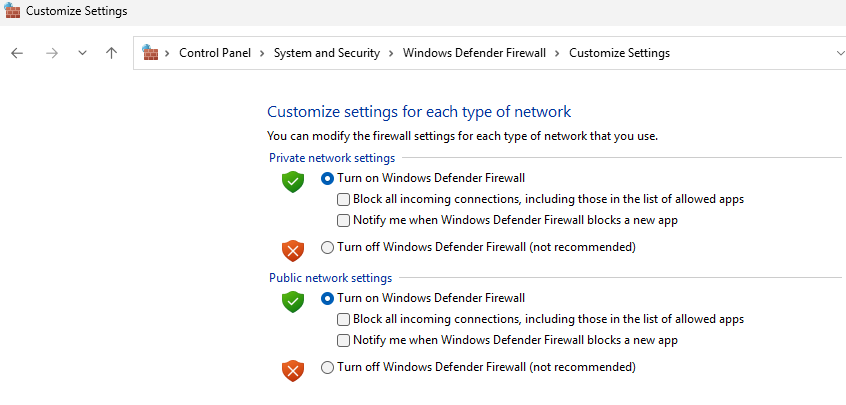
- Open Control Panel: Click the Start button, type Control Panel, and press Enter.
- Navigate to Security: Click on System and Security, then select Windows Defender Firewall.
- Change Settings: In the left-hand menu, click on Turn Windows Defender Firewall on or off.
- Enable Firewall: Select the radio button for Turn on Windows Defender Firewall under both the Private and Public network settings.
- Confirm: Click OK at the bottom of the window to apply the changes.
Note: After enabling, you may need to allow specific apps or features through the firewall to ensure your necessary business tools continue to function correctly.
Conclusion
Enabling and properly configuring a firewall is one of the most cost-effective and impactful security measures you can take. At The Link Source, we specialize in hardening server environments for Houston businesses, ensuring your digital perimeter and internal servers are impenetrable. Don't wait for a breach to realize the importance of a firewall—protect your local Houston infrastructure today.